From Event Networking to Lead Management: The TapMo Workflow
A successful event connection should lead to a useful next step. The tapmo.io workflow helps you move from a quick introduction to organized lead management.
You prepare your digital profile, share it instantly, capture interest, and manage every inquiry from one dashboard.
No paper forms. No scattered contact notes. Just a clearer path from networking to follow-up.
Why event networking needs a workflow
Events create many conversations in a short time. You may meet prospects, partners, suppliers, and future clients within a few hours.
But a conversation alone does not create a business opportunity.
You need to remember:
- Who did you meet?
- What did they need?
- Which people showed genuine interest?
- When should you contact them again?
- What information should you send?
Traditional business cards rarely answer these questions. They share contact details, but they do not help you organize the next step.
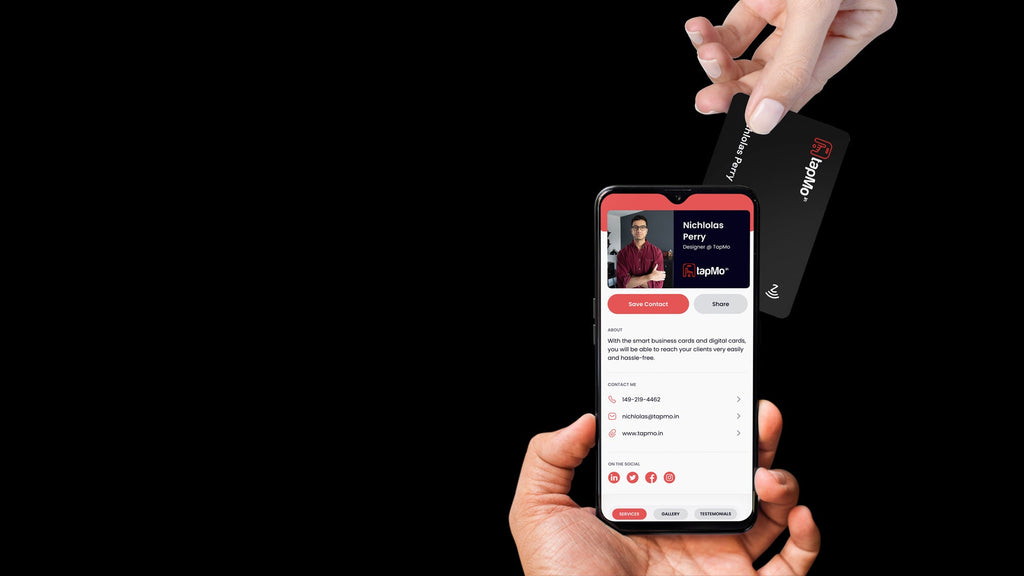
A digital business card for events gives you more control. It combines your identity, contact details, social links, portfolio, services, and lead form in one shareable profile.
That makes networking easier to continue after the event ends.
Prepare your digital profile before the event
Your event lead capture process starts before you enter the venue.
First, make sure your profile gives visitors a clear reason to connect with you. Your contact details should remain easy to find. Your key links should open quickly. Your profile should also reflect the conversation you expect to have.
Use these preparation steps:
-
Check your identity details
Add your name, role, company, profile photo, and other important professional information.
-
Update your contact options
Include your phone number, email address, website, and relevant social links.
-
Add your strongest proof
Use Featured Work, Gallery, Services, or Testimonials to show what you offer.
-
Keep Save Contact visible
Visitors can save your contact details directly to their phones.
-
Enable Exchange Contact
This gives visitors a way to share their details with you.
-
Review your Lead Form
Your profile can collect information such as name, email, mobile number, company, and message.
-
Test the profile on your phone
Check every button, link, and form before the event begins.
You can follow the TapMo digital profile creation guide to review each profile section.

Share your details with a tap, scan, or link
Your sharing method should match the event environment.
A tapmo.io NFC business card gives you the fastest physical option. Tap the card against a compatible smartphone, and your digital profile opens in the browser.
The recipient does not need to install an app.
You can also share your profile through:
- A QR code
- Your profile link
- A message on WhatsApp
- Social media
- A digital or physical event standee
The NFC card works well during face-to-face conversations. Your QR code helps when someone uses a phone without NFC. Your profile link works when you need to share after the conversation.
The goal stays the same: open one complete digital profile.
The visitor can then view your details, explore your work, save your contact, or exchange information with you.
You can learn more about the TapMo NFC business card and its sharing options.
Turn a conversation into a recorded connection
A tap starts the interaction. The profile helps you continue it.
After your profile opens, guide the conversation toward one useful action. Avoid asking visitors to complete too many steps. Keep the process natural.
You can say:
- “You can save my details here.”
- “You can also exchange your contact with me.”
- “My services and recent work are on this profile.”
- “Use the inquiry form if you want me to send more information.”
The visitor can choose Save Contact when they want your details.
They can choose Exchange Contact when they want to share their information with you.
They can also use your Lead Form to send a message. This creates a more useful connection than a name written on the back of a paper card.

Ask one helpful question
Your profile captures information. Your conversation adds context.
Ask one question before ending the interaction:
- “What are you currently looking for?”
- “Which service interests you most?”
- “When would you like to discuss this further?”
- “Should I send you the relevant details after the event?”
Remember the answer. Add it to your own event notes.
TapMo can organize submitted inquiries. Your notes can add the human context that forms cannot capture.
Capture leads through your profile
Not every event visitor becomes a lead. Some people only want to browse your profile.
That makes clear intent important.
A visitor may become a useful lead when they:
- Submit the Lead Form
- Use Exchange Contact
- Ask for more information
- Share a business requirement
- Request a meeting
- Show interest in your services
- Ask you to contact them later
Your digital profile gives these visitors a direct way to share their details.
The Lead Form can collect the information you need for the next conversation. Keep the form focused. Ask for details that help you respond properly.
For example:
- Name
- Email address
- Mobile number
- Company
- Message or inquiry
A shorter form usually feels easier during a busy event. You can collect additional information during your follow-up call.
Organize event leads from the dashboard
After the event, move from collecting leads to managing them.
Open the tapmo.io dashboard and review the Leads section. This area brings your profile inquiries into one place.
You can:
- Review submitted lead details
- Read each inquiry
- Filter your lead list
- Update lead status
- Export lead data
Status updates help you create a simple follow-up routine.
For example, you can separate leads into practical stages such as:
-
New
You have not contacted the person yet.
-
In progress
You have started a conversation.
-
Follow-up needed
You need to send information or contact them again.
-
Completed
You have addressed the immediate request.
Use the available status controls that match your dashboard. Avoid relying on memory alone.
A lead list becomes more useful when you know what needs attention next.
You can review the complete workflow in TapMo Dashboard Explained.

Follow up while the conversation remains fresh
The best follow-up connects directly to the event conversation.
Do not send the same message to every contact. Use the information you collected.
A simple follow-up structure works well:
-
Mention the event.
-
Mention the conversation.
-
Refer to the person’s interest.
-
Share one relevant resource.
-
Suggest a clear next step.
For example:
It was good speaking with you at the event. You mentioned interest in our design services. I’m sharing the relevant portfolio link here. Let me know if you’d like to discuss your upcoming project.
You can follow up through the contact details the visitor shared. Depending on the information available, you may use email, phone, or WhatsApp.
Your tapmo.io profile can also keep supporting the conversation. Visitors can return to your profile, review your services, explore your work, or use an available contact action.
The profile remains useful after the event ends.
Use analytics to improve your next event
Lead numbers show part of the picture. Profile activity gives you more context.
The tapmo.io dashboard includes analytics for profile engagement. You can review information such as:
- Profile views
- Leads
- Visitors
- Traffic sources
- Visitor locations
- Devices
- Top referrers
These insights can help you compare event activity with other sharing channels.
You may discover that:
- A QR code generated more visits than expected.
- A specific profile link received repeated views.
- Your Services section attracted attention.
- Visitors opened your profile but did not submit the form.
- One event created more inquiries than another.
Use these findings to improve your next event profile.
You may need to shorten your introduction, improve your Lead Form, update your featured work, or place a stronger action near the top of your profile.
Build a repeatable event lead management process
Your workflow should feel simple enough to repeat.
Before each event:
- Update your profile.
- Check your contact details.
- Test Save Contact and Exchange Contact.
- Review your Lead Form.
- Prepare your NFC card and QR code.
- Decide which services or projects to highlight.
During the event:
- Start a genuine conversation.
- Share your profile with a tap or scan.
- Encourage the right action.
- Ask one useful question.
- Record important context.
After the event:
- Review your Leads section.
- Update lead statuses.
- Export data when needed.
- Follow up with relevant information.
- Review analytics.
- Improve your next event workflow.
A digital business card for events should do more than replace paper. It should help you carry the relationship forward.
When you connect sharing, event lead capture, lead organization, and follow-up, every interaction becomes easier to manage.
Your next event can be more structured, more useful, and far easier to follow through.
It’s simple, organized, and consistently practical.
— Metadata for Shopify (copy these into the Shopify fields) —
SEO Meta Title: Event Networking to Lead Management Workflow
SEO Meta Description: Move from a quick event introduction to organised lead management. Learn the TapMo workflow: prepare, share with a tap, capture interest and follow up.
Shopify Excerpt: An event conversation only creates value when it continues afterward. This article walks through the TapMo workflow from event networking to lead management: preparing your profile, sharing with a tap, capturing enquiries and organising follow-up from the dashboard.